

 Back to other articles
 Last updated: April 29, 2026
 Interviews
 Data engineer
 System design
 Deeply researched
System design interviews for data engineers are a different beast from standard software engineering system design. Instead of designing for APIs and services, you’ll be expected to design end-to-end data pipelines and reason through how data is ingested, processed, and stored at scale.
Because the output itself is different, the tools, frameworks, and preparation are different, too. Most system design guides are written with SWEs in mind, so they often miss the DE-specific concepts you’ll be tested on.
We’ve put together this guide to fill in those gaps. Here, you’ll find the key topics to cover, commonly asked questions with a full worked answer, a data engineer-specific answer framework, and a prep plan to help you get ready.
- Overview
- Examples of data engineer system design questions (with answers)
- More examples of data engineer system design questions (by company)
- How to answer system design questions as a data engineer
- Prep plan
Click here to practice 1-on-1 with a data engineer ex-interviewer
Let’s get into it.
1. How do data engineer system design interviews work?
1.1 What is a system design interview for data engineers?
A data engineer system design interview is typically a 45-60-minute interview assessing your ability to build end-to-end data pipelines that are scalable, reliable, and maintainable.
You’re expected to propose a high-level design, outline the key components, and explain how data flows through the system. Building a technically sound pipeline is important in these interviews, but so is your ability to think through trade-offs around performance, cost, and data quality.
One distinction worth making early: system design questions are NOT the same as data modeling questions.
Data modeling focuses on the logic of the data. It tests your ability to create a blueprint, which includes defining tables, keys, and schemas. You are essentially solving for the "what": "Does the data make sense, and is it structured correctly to represent the business?"
System design focuses on the data infrastructure. You are defining ingestion, scaling, and fault tolerance to build the "engine" that moves that data, so that the system can handle the load and move data from point A to point B without crashing.
In interviews, these two often coincide, and in many cases, data modeling is an essential frist step. You may start by modeling the data, then shift to system design as the interviewer introduces scale constraints (e.g., real-time data or high volume) to ensure the system can handle throughput and reliability.
Next, let’s look at how data engineering system design interviews differ from software engineering interviews.
1.2 Software engineering system design vs data engineering system design
System design for software developers usually means building applications, designing APIs, and scaling services (e.g., “Design a ride-sharing backend like Uber”).
For data engineers, design focuses on the movement, transformation, and storage of data at a massive scale (e.g., “Design a real-time fraud detection pipeline for credit card transactions”).
According to Nimesh (ex-Google interviewer for DE, staff SWE), the architectural framework for both is similar, but the core objectives differ:
- SWE System Design: Focuses on request-response cycles
- E.g., API contract design, microservices orchestration, caching strategies, and minimizing user-facing latency to ensure high availability
- DE System Design: Focuses on data throughput and state
- E.g., data ingestion patterns, ETL/ELT pipeline efficiency, schema evolution, and the trade-offs between batch and streaming processing within a warehouse, lake, or lakehouse architecture.
Essentially, SWEs build a stable environment for users to interact with data, while DEs build a robust engine to process and store that data. One optimizes for the user session, the other for the data lifecycle.
1.3 What specific skills are being evaluated in DE system design interviews?
System design interviews assess whether you have the fundamental tools and theoretical knowledge required to function as a Data Engineer. According to Nimesh (ex-Google DE interviewer), you’ll be evaluated on the following areas:
- Design end-to-end data pipelines: the ability to architect the entire flow of data from source systems to end-user consumption (Workflow design: Ingestion → Storage → Transformation → Modeling → Orchestration)
- Understanding of ETL/ELT approaches: Knowing when to transform data before loading (Extract, Transform, Load) versus transforming it within the storage layer (Extract, Load, Transform)
- SQL, NoSQL, and schema design: Proficiency in writing complex queries and designing table structures (e.g., Star Schema, OBT). You should also know when to pivot from relational models to NoSQL for specific use cases like high-volume key-value lookups.
- OLTP vs. OLAP: Distinguishing between Online Transactional Processing (optimized for fast updates/inserts) and Online Analytical Processing (optimized for complex aggregations and reporting)
- Data warehouse / lake concepts: Understanding the trade-offs between structured, governed storage (Warehouse) and flexible, raw storage (Lake) or a hybrid (Lakehouse)
- Handling of batch vs. streaming: Deciding between processing data in large, scheduled intervals versus real-time, event-driven streams
- Cost & Performance Optimization: Demonstrating how to make a system efficient through Partitioning, Clustering, and Z-Ordering to minimize storage costs and maximize query speed
- Tool/Platform experience: Practical knowledge of the modern stack, specifically BigQuery, Snowflake, Databricks, Spark, and Kafka
- Operational thinking: thinking around data quality, deduplication, late data, backfills, and observability
Coaches who contributed to this guide



2. Examples of system design questions for data engineers (with answers) ↑
Now that you understand the expectations for data engineering system design interviews, let’s look at three common questions gathered from Glassdoor across top tech companies like Google, Meta, and Amazon.
Each answer uses the 4-step framework, which will be explained in detail in Section 4. If you want to understand the reasoning behind the structure first, start there and come back.
We recommend attempting each question yourself first, then checking your answer against the sample to find out where you can still improve.
- Design a data pipeline to process and aggregate user clickstream data in near real-time (Google)
- Design a scalable data pipeline for processing real-time streaming data from multiple sources, ensuring data integrity, fault tolerance, and efficiency (Meta)
- Design a data warehouse system to help a customer support team manage tickets (focusing on data freshness SLAs and system integration) (Amazon)
Right, let’s dive into each.
2.1 Design a data pipeline to process and aggregate user clickstream data in near real-time (Google) ↑
This is one of the most common questions you'll get at Google data engineer system design interviews.
Google must collect huge amounts of data in order to remain at peak performance. Modeling, warehousing, and moving that data from one spot to another are key to keeping its systems up and running.
Interviewers will be testing you on your ability to bring datasets together to solve realistic problems that Google data engineers face daily, such as handling massive-scale ingestion (billions of events) and optimizing real-time processing to provide instant insights for products and advertisers.
Let’s take a look at the sample answer outline below.
Example answer outline: “Design a data pipeline to process and aggregate user clickstream data in near real-time”
1. Ask clarifying questions
- Scope: Are we collecting events from all platforms (Web, iOS, Android)? Does "near real-time" include the dashboarding layer or just the delivery to the data warehouse?
- Functional requirements: Ingest raw clicks, perform sessionization (grouping clicks by user session), and calculate metrics like Active Users (DAU) and Top 10 Trending Pages every minute.
- Non-functional requirements:
- Scale: 100M Daily Active Users (DAU). 10B events/day. Peak throughput of 500k events/sec.
- Latency: End-to-end latency (click to dashboard) < 60 seconds.
- Availability: 99.99%. We cannot lose raw data even if the processing layer is down.
- Consistency: Eventual consistency for dashboards; Exactly-once processing for "Gold" level reporting tables to avoid double-counting.
- Data Characteristics: Semi-structured JSON. High variance in traffic (peaks during marketing events).
2. Design high-level
- Data Lifecycle Identification:
- Ingestion: Mobile/Web SDKs → Load Balancer → Ingestion Service (Java/Go).
- Stream Buffer: Raw events pushed to Apache Kafka or AWS Kinesis.
- Processing: Apache Flink or Spark Streaming for windowed aggregations.
- Storage (Raw/Bronze): S3 or GCS for long-term "immutable" storage.
- Storage (Serving/Gold): ClickHouse or Druid for real-time OLAP; BigQuery or Snowflake for historical BI.
- Entity Identification: user_id, session_id, event_type (click, view, hover), timestamp, page_url.
- APIs: POST /v1/collect/event (Ingestion) and GET /v1/analytics/realtime-stats (Consumption).
3. Drill down on your design
- Ingestion & Schema Registry:
- Use a Schema Registry (Avro/Protobuf) to ensure events match the expected structure.
- Malformed events are routed to a Dead Letter Queue (DLQ) in S3 to prevent the pipeline from breaking.
- Stream Processing:
- Windowing: Use Tumbling Windows for 1-minute counts and Session Windows (30-min gap) for user sessionization.
- State Management: Use Flink's managed state to keep track of user_id to calculate Uniques accurately without re-scanning historical data.
- Watermarking: Handle Late-Arriving Data by allowing a 5-minute buffer for events that were cached on mobile devices during network drops.
- Storage & Modeling:
- Partitioning: Partition S3 raw data by event_date/event_hour and event_type to optimize cost for batch backfills.
- Compaction: Real-time files are small. Use a background process to merge small files into larger Parquet files to improve read performance.
- Deduplication Strategy:
- Mobile retries cause duplicates. Implement Idempotent Writes or use a Bloom Filter in the streaming layer to drop events with the same event_id within a 24-hour window.
- Operational Excellence:
- Backfill Strategy: If the "Session Duration" logic changes, run a Batch Spark Job on the S3 Raw (Bronze) data to re-populate the Serving (Gold) tables.
- Observability: Monitor Consumer Lag (how far behind Kafka the stream is) and Data Drift (unexpected changes in the volume of specific event types).
4. Bring it all together
- Start with scope clarity: Real-time ingestion and aggregation for 100M DAU with sub-minute latency.
- Framework: Use a Lambda/Kappa Architecture variant. Kafka for buffering, Flink/Spark for processing, and S3 for the source of truth.
- Key Design Decisions: Use Watermarking for out-of-order data and Schema Registry for governance.
- Storage Strategy: Use a specialized Real-time OLAP (ClickHouse/Druid) for sub-second dashboard queries, while keeping a Data Lake for ML and historical analysis.
- Resilience: Handle spikes via Kafka's disk buffering. Handle logic changes via a robust Backfill Pipeline from S3 raw data.
- Success Metrics: Measure P99 latency, data completeness (Raw vs. Aggregated), and cost-per-million events.
2.2 Design a scalable data pipeline for processing real-time streaming data from multiple sources, ensuring data integrity, fault tolerance, and efficiency (Meta) ↑
Meta relies heavily on streaming data to power features like feeds, ads, and real-time insights.
Because of this, interviewers want to see that you are capable of designing pipelines that can handle continuous data ingestion from multiple sources while maintaining strong guarantees around data integrity, fault tolerance, and efficiency.
Below is one way to approach this question using the 4-step framework.
Example answer outline: “Design a scalable data pipeline for processing real-time streaming data from multiple sources, ensuring data integrity, fault tolerance, and efficiency”
1. Ask clarifying questions
- Scope: Unified company-wide "Data Bus" or a specialized pipeline for Ads/Engagement?
- Functional requirements: Support heterogeneous sources (Mobile logs, DB CDC, APIs). Perform real-time joins, filtering, and windowed aggregations.
- Non-functional requirements:
- Scale: Multi-petabyte daily volume. Millions of events per second at peak.
- Latency: Sub-second ingestion; < 30 seconds for analytical availability.
- Fault Tolerance: Zero data loss. System must survive a regional data center outage.
- Integrity: Exactly-once processing for critical business metrics.
2. Design high-level
- Ingestion: Distributed Log Service (e.g., Scribe) → Global Message Bus (Kafka/StreamHub).
- Storage: SSD-backed buffer for active processing; S3/HDFS for raw long-term archival.
- Processing: Apache Flink or Spark Streaming for stateful transformations.
- Modeling: Raw Logs (Bronze) → Standardized/Cleaned (Silver) → Aggregated Tables (Gold).
- Serving: Presto/Trino for ad-hoc SQL; Scuba/Pinot for real-time internal monitoring.
- APIs: PushEvent(source_id, event_blob) and SubscribeStream(topic_id, offsets).
3. Drill down on your design
- Exactly-Once Semantics: Use Checkpointing and Two-Phase Commits in the streaming engine. Implement Idempotent Sinks to prevent double-counting during retries.
- Schema Evolution: Implement a Centralized Schema Registry (Thrift/Protobuf). Enforce validation at the ingestion gate to block malformed "poison pill" events.
- Regional Resilience: Deploy Multi-Region Replication. Ingest to a local region and replicate to a follower; automatically failover traffic to the "East" region if the "West" goes offline.
- Efficiency: Use Zstandard (Zstd) compression at the producer level to minimize network I/O. Use Columnar formats (ORC/Parquet) for historical archives to optimize scan performance.
- Backfill Strategy: Maintain a "Shadow Pipeline" using Batch Spark jobs to re-process raw data lake files if historical logic needs correction.
- Observability: Monitor Consumer Lag and Data Drift to detect upstream bugs or processing bottlenecks in real-time.
4. Bring it all together
- Concept: Architecting a multi-source, global pipeline handling millions of events/sec with strict integrity.
- Architecture: Decoupled distributed message bus (Kafka) and stateful stream processors (Flink).
- Governance: Centralized Schema Registry and PII masking at the ingestion layer.
- Storage Strategy: Tiered approach—Scuba for sub-second visibility and Presto/Hive for petabyte-scale historical analysis.
- Resilience: Multi-region deployment with automated failover and batch backfill capabilities.
- Success Metrics: End-to-end latency, Data Loss rate (Zero), and System Throughput Efficiency.
2.3 Design a data warehouse system to help a customer support team manage tickets, focusing on data freshness SLAs and system integration (Amazon) ↑
Amazon relies heavily on data warehouses to support operational teams like customer support, where timely and accurate data is critical for decision-making.
Interviewers are looking for your ability to design a system that maintains strict Service-Level Agreements (SLAs), integrates disparate systems (Zendesk, Salesforce, Chat logs), and provides real-time insights alongside robust historical trend analysis.
Example answer outline: “Design a data warehouse system to help a customer support team manage tickets (focusing on data freshness SLAs and system integration)”
1. Ask clarifying questions
- Scope: Does this include real-time monitoring for live agents, or is it strictly for historical reporting? (Assume both: a "Speed Layer" for live stats and a "Batch Layer" for deep analysis).
- Functional requirements: Track ticket volume, resolution time (TTM), agent performance, and customer satisfaction (CSAT). Integrate data from the ticketing system (e.g., Zendesk), call logs, and the customer CRM.
- Non-functional requirements:
- Data Freshness SLA: Real-time dashboards need < 5-minute latency. Daily executive reports need 100% accuracy.
- Scale: Support for 10k agents and millions of historical tickets.
- Security: Strict PII masking (masking customer emails/phone numbers) is required for compliance.
2. Design high-level
- Ingestion: Ticketing system Webhooks/APIs and CRM Change Data Capture (CDC) → Message Bus (Kafka/PubSub).
- Storage: * Operational Store: Elasticsearch/OpenSearch for fast, real-time ticket searching and live stats.
- Analytical Store: Data Warehouse (BigQuery/Snowflake) for historical trends.
- Processing: Apache Flink (Streaming) for real-time KPIs; dbt or Spark (Batch) for daily aggregations in the warehouse.
- Modeling: Star Schema in the warehouse.
- Fact Table: fact_ticket_events.
- Dimension Tables: dim_agents, dim_customers, dim_products.
- APIs: GET /v1/tickets/stats for real-time dashboards.
3. Drill down on your design
- Meeting Freshness SLAs (The Speed Layer):
- Use a Lambda Architecture approach. Streaming data from Kafka is pushed directly into an Elasticsearch index. This allows managers to see ticket "burn-down" rates and active queues with seconds of latency.
- System Integration:
- For the CRM (Salesforce), use Change Data Capture (CDC) to stream updates whenever a customer’s status changes. This ensures the "Customer Dimension" in your warehouse is never stale.
- Modeling for Support Metrics:
- Slowly Changing Dimensions (SCD Type 2): Use SCD Type 2 for dim_agents. If an agent moves from the "Hardware" team to the "Software" team, we need to preserve history to know which team was responsible for the ticket at the time of resolution.
- Data Quality & Freshness Monitoring:
- Implement SLA Tracking. Create a metadata table that records the "Last Loaded Timestamp" for every source. If the gap between "Current Time" and "Data Time" exceeds 5 minutes, trigger an automated alert.
- Operational Excellence
- Backfill Strategy: If a new metric is defined (e.g., "First Response Time"), use the raw logs stored in S3 to re-calculate the metric for the last 2 years using a Spark job.
- PII Masking: Use a Hashing/Tokenization Service during ingestion to mask customer names before they hit the Data Warehouse, ensuring BI analysts can see trends without seeing private info.
4. Bring it all together
- Concept: Building a dual-layered system that serves live operations and long-term business intelligence.
- Architecture: Ingestion via Kafka, real-time serving via Elasticsearch, and long-term warehousing via Snowflake/BigQuery.
- Key Design Decisions: Use CDC for CRM synchronization and SCD Type 2 for agent history.
- Freshness: Guaranteed < 5-minute latency through a streaming Flink/Dataflow pipeline.
- Governance: Centralized masking for PII and automated SLA monitoring for ingestion lag.
- Success Metrics: Data Freshness (SLA adherence), Query Latency for BI tools, and Data Completeness across integrated sources.
3. More examples of data engineering system design questions (by company) ↑
Now, let’s get into the complete list of system design interview questions asked in interviews for data engineer roles at Meta, Google, and Amazon. Polish your skills using the questions below.
Example of DE system design interview questions at Meta
- Design a scalable data pipeline for processing real-time streaming data from multiple sources, ensuring data integrity, fault tolerance, and efficiency.
- Design the system for Google Classroom (focusing on massive concurrency, file vs. metadata storage, and peak traffic management).
Check out our Meta data engineer interview guide for more company-specific insights.
Example of DE system design interview questions at Google
- What type of technology would you need to build YouTube / a video streaming service architecture?
- Can you design a simple OLTP architecture that will convince the Redbus team to give X project to you?
- How would you build a data pipeline around an AWS product that is able to handle increasing data volume?
- When is Hadoop better than PySpark?
- How do you integrate data from multiple systems (handling disparate sources, schema evolution, and deduplication)?
- How do you design a comprehensive backup strategy for a million-scale data storage?
- Design a data pipeline to process and aggregate user clickstream data in near real-time.
Check out our Google data engineer interview guide for more company-specific insights.
Example of DE system design interview questions at Amazon
- How do you manage a table with a large number of updates while maintaining availability for a large number of users?
- Given a specific scenario, how would you design the pipeline for ingesting this data?
- Design a system that processes a lot of user orders each day.
- Follow up: The current system is performing slow; how would you test and improve the database?
- Design a data warehouse system to help a customer support team manage tickets (focusing on data freshness SLAs and system integration).
- Explain how you orchestrate an ETL pipeline using AWS Glue (focusing on triggers, retries, and job bookmarks).
Check out our Amazon data engineer interview guide for more company-specific insights.
4. How to answer system design questions as a data engineer ↑
Now that you’ve seen what strong answers look like in practice, it’s worth understanding the framework behind them.
The 4-step method below structures each of the answers above. It’s adapted from IGotAnOffer’s system design framework, but tailored for data engineers, with a stronger focus on data flow, pipeline design, and trade-offs around scale, reliability, and data quality.
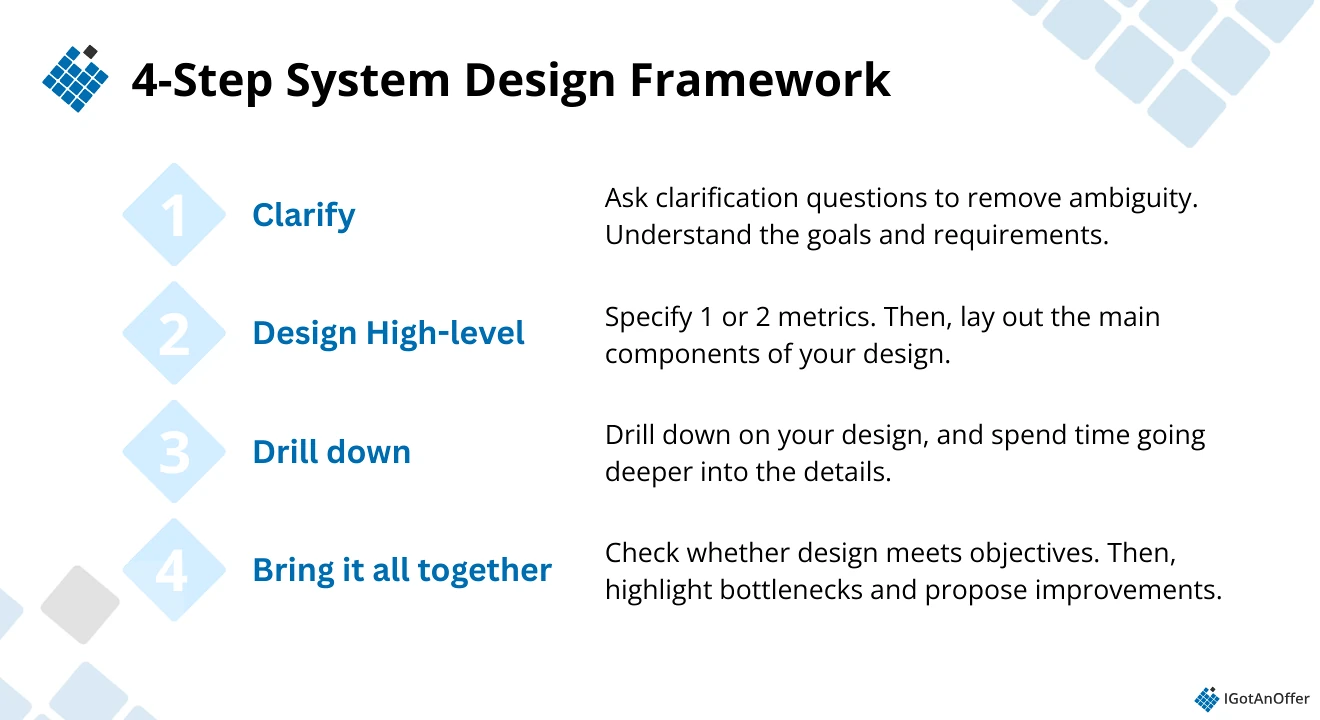
Step 1: Ask clarifying questions
First, spend a few minutes aligning with your interviewer on the functional and non-functional requirements of the system you’re designing. Ask about the data sources, expected outputs, and how the data will be used (e.g., dashboards, analytics, or downstream systems). Make sure you fully understand the problem before moving forward.
Call out any assumptions that will influence your design. If applicable, ask about non-functional requirements such as scale (data volume and velocity), latency/data freshness, reliability, and data quality expectations.
Step 2: Design a high-level architecture
Start by identifying one to two key metrics (e.g., events per second, daily data volume, data freshness SLA). Use these to estimate scale and guide your design.
Then, outline the main components of the data pipeline: ingestion (e.g., APIs, logs), buffering (e.g., Kafka/Kinesis), processing (e.g., Spark/Flink), and storage (e.g., data lake, warehouse, or serving layer). Show how data flows through the system end-to-end.
Before diving deeper, define your data layer and storage strategy. Choose between batch vs. streaming and ETL vs. ELT, and outline your data model, storage approach, and partitioning strategy at a high level.
Step 3: Drill down on your design
If you haven’t already, sketch out your architecture and walk your interviewer through the data flow step by step.
Consider potential bottlenecks across the pipeline, such as ingestion limits, processing delays, or storage constraints. Explain how your design handles real-world issues like late-arriving data, duplicates, and data quality.
To finalize your design, go deeper into one component (e.g., stream processing, schema design, or orchestration). If you’re unsure which area to explore, ask your interviewer.
Step 4: Bring it all together
Before wrapping up, take a few minutes to revisit your design. Does it meet the requirements you defined at the start, especially around scale, data freshness, and reliability?
It’s okay to refine parts of your design at this stage, but explain your reasoning clearly. Summarize your key decisions and trade-offs, and highlight how your system ensures data quality and can adapt over time (e.g., backfills, monitoring, schema evolution).
Apply this framework to practice questions like the ones above. Use it across different scenarios so you can adapt it to varying data pipelines and handle follow-up questions with confidence.
To help you make sure you cover the right information in your answer, check out our system design interview cheatsheet prepared by coach Mark (ex-Google EM and interview coach). It was written for SWE, but may also be adapted for data engineering.
5. How to prepare for data engineer system design interviews ↑
As you can see from the complex questions above, there is a lot of ground to cover when it comes to data engineer system design interview preparation. So it’s best to take a systematic approach to make the most of your practice time.
Below, you’ll find a prep plan with links to free resources.
5.1 Learn the concepts
In addition to the topics mentioned in Section 1.3, it’s also important to have a solid understanding of core system design fundamentals, as they form the foundation for building scalable data systems.
You don't need to know EVERYTHING about sharding, load balancing, queues, etc.
However, you will need to understand the high-level function of typical system components. You'll also want to know how these components relate to each other, and any relevant industry standards or major trade-offs.
To help you get the foundational knowledge you need, take a look at our 9-part deep dive on system design concepts. Click on the topic to go directly to the article you need.
- Network, protocols, and proxies
- Databases
- Latency, throughput, and availability
- Load balancing
- Leader election algorithms
- Caching
- Sharding
- Polling, SSE, and WebSockets
- Queues and pub-sub
5.2 Study the company you're applying to
If you already have a system design interview scheduled at a specific company, take the time to familiarize yourself with how its entire interview process works.
Before you prep, research your specific target. Check Glassdoor for recent data engineer candidate reports for system design at that company.
Read your target company's engineering blog to understand what kinds of technical problems they're actually working on. This gives you useful context for which question types are most likely and what product considerations matter to that specific company.
Your system design round is just one of the many topics you'll cover as a DE candidate. Know where it fits into the bigger picture by familiarizing yourself with the entire interview process.
Here are relevant IGotAnOffer company-specific data engineering guides to get you started:
- Google data engineer interview guide
- Meta data engineer interview guide
- Amazon data engineer interview guide
5.3 Practice by yourself
A great way to start practicing is to interview yourself out loud. This may sound strange, but it will significantly improve the way you communicate your answers during an interview.
Use a piece of paper and a pen to simulate a whiteboard session, or use a whiteboard if you have one. There are also online whiteboarding tools like Excalidraw, Visual Paradigm, or Sketchboard.me, which are particularly useful for practicing for virtual interviews.
To prepare effectively, we also recommend using the following resources:
- System Design for Data Engineers by Akanksha Singh
- Why System Design Interviews Confuse Data Engineers (And How to Crack Them in 2025) by Vishal Barvaliya
- System design interview questions and prep guide (by IGotAnOffer)
- System design interview tips from ex-FAANG interviewers (by IGotAnOffer)
- Generative AI system design interview guide (by IGotAnOffer)
- ML system design interview guide (by IGotAnOffer)
If you're specifically targeting a Staff-level role, we also recommend checking out our Staff system design interview guide for a deeper dive into what interviewers expect at this level.
Once you have a strong foundation in the material, the next step is practicing under real conditions. But by yourself, you can’t simulate thinking on your feet or the pressure of performing in front of a stranger. Plus, there are no unexpected follow-up questions and no feedback.
That’s why many candidates try to practice with friends or peers.
5.4 Practice with peers
Once you've done some individual practice, we strongly recommend that you practice with someone else interviewing you.
If you have friends or peers who can do mock interviews with you, that's an option worth trying. It’s free, but be warned, you may come up against the following problems:
- It’s hard to know if the feedback you get is accurate
- They’re unlikely to have insider knowledge of interviews at your target company
- On peer platforms, people often waste your time by not showing up
For those reasons, many candidates skip peer mock interviews and go straight to mock interviews with an expert.
5.5 Practice with ex-interviewers
In our experience, practicing real interviews with experts who can give you company-specific feedback makes a huge difference.
Find a system design interview coach so you can:
- Test yourself under real interview conditions
- Get accurate feedback from a real expert
- Build your confidence
- Get company-specific insights
- Save time by focusing your preparation
Landing a job at a big tech company often results in a $50,000 per year or more increase in total compensation. In our experience, three or four coaching sessions worth ~$500 make a significant difference in your ability to land the job. That’s an ROI of 100x.
Click here to book mock interviews with experienced system design interviewers.