

 Back to other articles

 Last updated: June 02, 2026
 Interviews
 Software engineer
 AI-assisted coding
 Deeply researched
The rise of AI tools has changed coding workflows entirely. Because of this, companies including Meta, Microsoft, Google, and Canva are beginning to roll out AI-assisted coding interviews to test how effectively AND responsibly candidates can work with AI.
If you’re applying for a software engineering role, you’ve probably noticed the lack of information around these interviews. That’s because the process is still evolving, and many companies are actively experimenting with different formats and tools.
But that doesn’t mean you need to go in blind. Here, you’ll find an overview of how AI-assisted coding interviews work, how candidates can maximize AI during the interview, and best practices from experts at companies like Meta and Microsoft.
- What are AI-assisted coding interviews?
- How AI-assisted coding interviews work
- How to maximize the use of AI in coding interviews
- AI-assisted coding interview best practices (from FAANG+ experts)
- How to prepare
Click here to practice coding interviews 1-on-1 with ex-FAANG interviewers
Let’s get started.
1. What are AI-assisted coding interviews? ↑
AI-assisted coding interviews are typically 60-minute coding rounds that allow candidates to use AI during the interview. Because these interviews are relatively new, many companies are experimenting with different formats.
Generally, you’ll be given an overview of the coding environment and the problem setup. Then, you’ll either be allowed to use approved AI tools or choose your own tools while solving coding tasks inside environments like CoderPad or VS Code.
These AI tools may include GitHub Copilot, Claude, Claude Code, or ChatGPT.
That said, the exact interview format can still vary significantly from one company to another.
For most companies, such as Meta and Microsoft, using AI is completely optional during the interview. “You are not evaluated on how often you use it. What matters is your ability to think critically, understand the code, and make informed decisions," says John (Meta engineering manager).
Companies also have various rollout strategies. At Meta, AI-assisted coding interviews are currently in the pilot stage, so not everyone may get them. At Microsoft, they are exclusive to AI-focused orgs like CoreAI and Copilot.
“During the interview, candidates typically solve focused coding tasks in VS Code with GitHub Copilot enabled, particularly for ML and data-processing interviews,” says Jyotsna (Microsoft Principal EM).
1.2 Traditional coding vs AI-assisted coding interviews
In traditional coding interviews, candidates are usually asked to code inside a dedicated interview platform such as CoderPad or HackerRank. You’ll be given a medium-to-hard LeetCode-style question, OR occasionally “trivia” questions that test your understanding of specific coding concepts.
Aside from problem-solving skills, interviewers also assess your ability to communicate and collaborate. This means you’re expected to talk through your thought process, explain trade-offs, and work collaboratively with the interviewer instead of silently coding for the entire session.
AI-assisted coding interviews still test many of the same skills. However, instead of solving isolated algorithm questions, such as “Reverse a linked list” or “Implement an LRU cache,” you’ll be asked to solve a larger problem built around an existing codebase or file tree.
Using an optional AI tool, you should be able to produce clean, bug-free, fast code while still maintaining ownership over the final solution.
In any case, you should ALWAYS treat AI as a supplementary tool rather than relying too heavily on it. John says, "A useful way to frame the use of AI in coding is to look at it as a tool best used for local optimization (i.e., syntax, structure, enumeration, summarization)."
This means the candidate remains responsible for the following as they would in traditional coding rounds:
- Problem decomposition
- Architecture choices
- Correctness
- Tradeoffs
- Communication
"That ownership is exactly what interviewers evaluate in this round," says John.
Learn more about how traditional coding interviews work in our coding interview guide. In the next section, we’ll look at the additional skills that AI-assisted coding interviews test for.
1.3 What skills are being tested during AI-assisted coding interviews?
AI-assisted coding interviews are designed to test whether candidates can effectively work with modern AI tools without relying on them as a crutch.
According to AI coding interview experts, John (Meta engineering manager) and Jyotsna (Microsoft Principal EM), most companies will evaluate you on the following criteria during the interview:
- Ability to understand existing code and navigate larger codebases
- Code quality and maintainability
- Debugging and verification skills
- Problem-solving skills
- Logical and clear communication
- Capacity to explain and justify decisions
- Adaptability when problems expand in scope
- Ability to effectively guide and correct AI-generated output
Ultimately, you should be able to use AI to accelerate your workflow while still thinking critically, making sound engineering decisions, and maintaining ownership over the final solution.
Coaches who contributed to this guide






2. How AI-assisted coding interviews work ↑
To give you a sense of what to expect, we’ve put together a breakdown of how Meta’s AI-assisted coding interviews work, with help from one of our expert coaches, Meta engineering manager John.
Again, the process can vary significantly across companies, so it’s still best to ask your recruiter what to expect during the interview.
Just a quick note about our expert resource for this section: John is an engineering manager who has interviewed 3000+ candidates across software engineering and management roles at Meta and other top tech companies like AWS and Huawei.
Right, let’s dive in!
2.1 Interview format
You will work through one multi-part problem over the course of about 60 minutes.
The question is structured into several stages, allowing the interviewer to observe how you understand existing code, build new functionality, and extend a system.
The round allows you to use AI assistance in CoderPad, but using it is optional, meaning you are not evaluated on how often you use it. What matters is your ability to think critically, understand the code, and make informed decisions.
If you use AI-generated suggestions, be ready to explain:
- why the code works,
- what trade-offs were made, and
- how it fits into the larger system.
2.2 Coding environment
When you start this round, your interviewer will likely give you an overview of the coding environment. This is what it will generally include:
Pre-written code and test cases
Some helper code, data files, or tests may already be provided so you can focus on reasoning and problem-solving rather than boilerplate.
Moderate codebase size
Expect around a few hundred lines of existing code or data. This is intended to provide context and prevent superficial solutions.
Both coding and non-coding tasks
Not every step involves writing code. You may be asked to:
- analyze runtime behavior,
- interpret data,
- justify design choices,
- reason about contracts or interface changes.
2.3 Structure
You’ll find that the structure of this coding round will be in three parts:
Part 1: Explore and Fix Issues
Begin by reading through the existing files, tests, and data to get a clear sense of how the system works.
Then start examining the existing code and resolving failing tests or small bugs. This should help you warm up and become familiar with the project before moving into larger tasks.
Part 2: Implement New Functionality
Next, you’ll be asked to complete a clear, well-defined requirement, like a new function or feature. For this part, you may implement this yourself or use AI assistance, but you should still be able to understand and justify the final result.
Part 3: Extend and Improve the System
Finally, you’ll need to tackle a broader, open-ended task which may involve:
- modifying existing components,
- adding a more complex feature,
- optimizing performance, or
- adapting the design to new conditions.
There is room for deeper exploration, so to be a strong candidate, you can and should continue advancing the solution.
Learn more about Meta’s AI-enabled coding interview rounds.
3. How to maximize the use of AI in coding interviews ↑
To be a strong candidate, you'll want to use AI assistance in the following ways:
- As a pair programmer for micro-tasks, while keeping ownership of the overall solution, tradeoffs, and verification
- As a product partner, to dig into the requirements and verify assumptions
- As a tech lead, to analyze the feasibility of the solution
In particular, AI assistance is quite useful for performing coding subtasks. Here are some use cases where AI might be helpful, including some sample prompts that you can use, according to John:
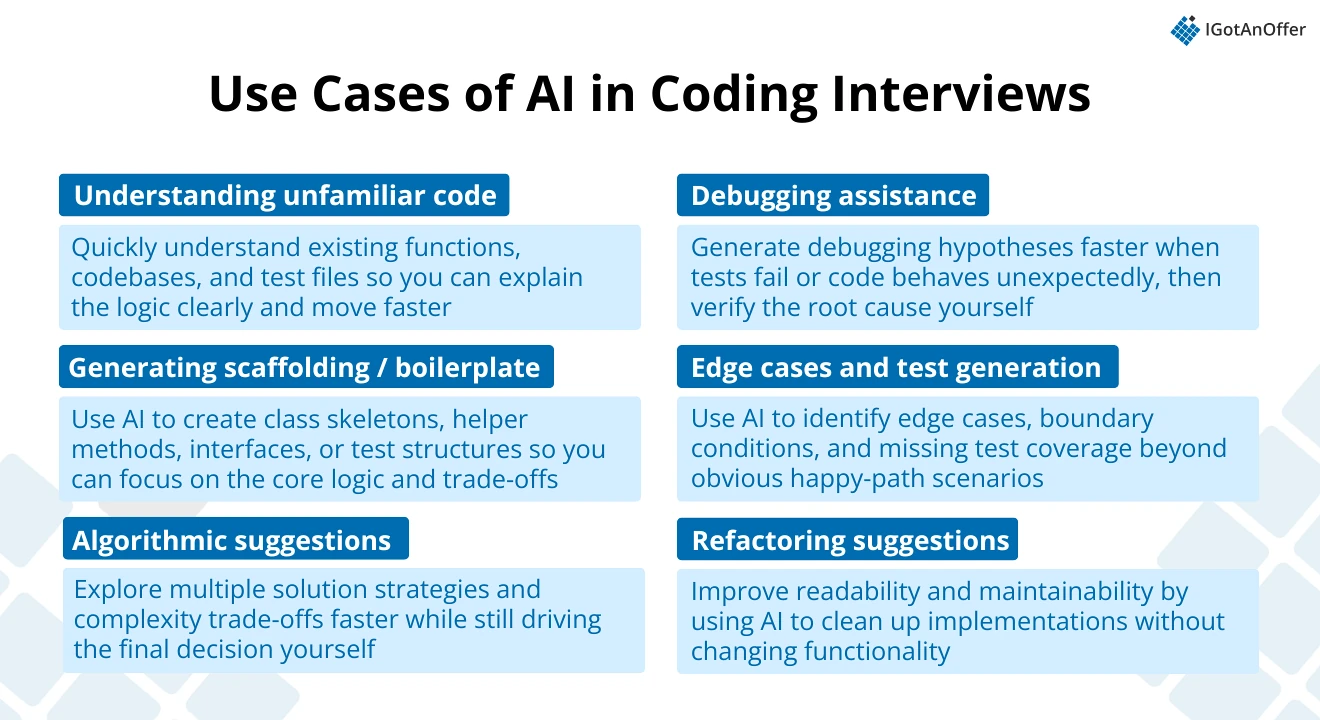
3.1 Understanding unfamiliar code / summarization - to get the context
One of the most common uses of AI in these interviews is quickly building a mental model of an existing codebase or function.
These rounds often (almost always) start with reviewing existing code or fixing/creating simple unit tests as a warm-up. AI can accelerate comprehension, but candidates still need to validate and clearly articulate their understanding aloud.
Sample prompt:
“Explain what this function does step by step, including inputs, outputs, and edge cases. Summarize in 5 bullets.”
3.2 Generating scaffolding or boilerplate
If you want to save time on syntax and setup, AI can help generate the initial structure for classes, interfaces, helper methods, or test skeletons. This allows candidates to focus more on logic, trade-offs, and problem-solving during the interview.
Sample prompt:
“Create a Python class skeleton for a rate limiter using a token bucket approach, including method stubs and comments.”
3.3 Algorithmic suggestions / alternative approaches
AI can also help you quickly explore different solution strategies and complexity trade-offs, especially when you’re deciding between multiple approaches or trying to optimize your solution.
This can speed up brainstorming, but you are still expected to select the best approach, justify your decisions, and adapt based on the problem constraints and trade-offs.
Sample prompt:
“Given this problem, list 2–3 possible approaches with time/space complexity.”
3.4 Debugging assistance
If you’re struggling to identify why a test is failing or why the code behaves unexpectedly, AI can help accelerate hypothesis generation. However, you’ll still need to reproduce the issue, isolate the root cause, and verify the fix yourself.
Sample prompt:
“This test fails with input X. Here’s the code and output. What are the likely causes?” or simply “Why did this test fail?”
3.5 Edge cases and test generation
If you’re struggling to expand coverage beyond happy paths, AI can help you enumerate edge cases quickly. To be a strong candidate, however, you still need to proactively validate correctness and test beyond just the obvious inputs.
Sample prompt:
“Generate edge cases for this function, especially around nulls, boundaries, and concurrency.”
3.6 Refactoring suggestions
Using AI for refactoring allows you to show your code development and understanding skills, in particular, your focus on durability, readability, and maintainability. It can also help clean up messy implementations or simplify logic without changing the behavior of the code.
Sample prompt:
“Refactor this function to improve readability and maintainability without changing behavior.”
4. AI-assisted coding interview best practices (from FAANG+ experts) ↑
In the previous section, we’ve rounded up a few ways you can use AI during your coding interview. Here are a few more best practices John (Meta engineering manager) and Jyotsna (Microsoft Principal EM) recommend:
4.1 Start by understanding the problem first before prompting AI
Clarify requirements, restate the problem, and identify constraints and edge cases.
4.2 Use narrow, specific prompts
Avoid using prompts like “Solve the whole problem,” or “Write the code for the task: xxx.” Specific prompts lead to usable output and reduce hallucinations.
4.3 Always verify AI-generated code
Assuming the generated code works can only lead to potential failure. Make sure you walk through the logic line by line, run small test cases, and explain out loud. Most companies like Meta explicitly evaluate whether candidates verify AI output.
4.4 Treat AI suggestions as hypotheses, not as answers
Strong candidates say things like: “Let’s validate this,” “I want to test this assumption,” or “This approach might fail when…” This signals engineering judgment. You should remain in control of the solution throughout the interview and use AI as a supplementary tool rather than the primary decision-maker.
4.5 Keep communicating while using AI
You must narrate why you’re prompting, what you expect to get back, and how you interpret results. Silently pasting AI output is a red flag and could get you a low score for technical communication.
4.6 Optimize for clarity and maintainability, not just passing tests
Interviewers care about: readability, structure, naming, modularity, not just correctness. AI can help refactor, but to be a strong candidate, you must drive quality standards.
4.7 Avoid over-optimizing prematurely
First, you must achieve correctness and clarity, then optimize if time permits. This is similar to system design interview considerations: you don’t want to only focus on one part while the whole design is still scattered.
4.8 Never ignore the integration context
Many candidates make the mistake of writing code that doesn’t align with the surrounding system. Make sure you explicitly consider APIs, dependencies, and how the new code fits into the existing structure.
4.9 Practice coding with AI before the interview
Don’t wait until the interview to use tools like GitHub Copilot, ChatGPT, or AI-enabled IDEs for the first time. Practice solving coding problems using different AI workflows so that prompting, reviewing suggestions, and switching between tools feel natural during the interview.
Want more tips to improve at coding interviews? Check out our guide on how to get better at coding interviews, which includes insights and advice from ex-FAANG interviewers.
5. How to prepare for AI-assisted coding interviews ↑
As you can see from the information above, there is a lot of ground to cover when it comes to AI-assisted coding preparation. So, it’s best to take a systematic approach to make the most of your practice time. We recommend the three steps below.
5.1 Practice on your own
Before you start practicing interviews, you’ll want to make sure you have a strong understanding of the relevant algorithms and data structures. Here are a few self-prep recommendations from John (Meta EM) to ace your AI-assisted coding interview:
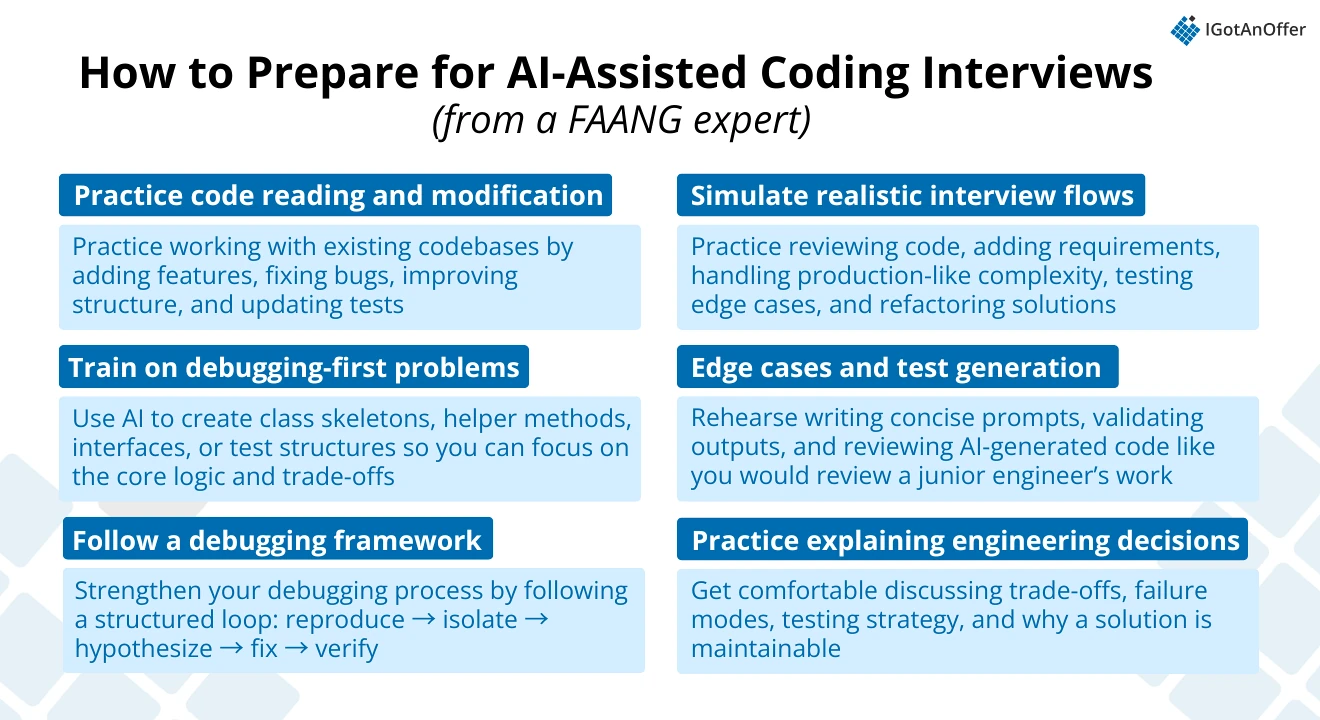
- Focus on code reading + modification. Good practice resources for this task include small GitHub projects with open issues and real production snippets (even personal projects). Practice tasks like:
- Given the existing code, add a feature
- Fix a bug
- Improve structure
- Create/Fix unit tests
- Practice debugging-first problems like broken implementations of LRU cache, incorrect binary search, flawed rate limiter, and buggy REST handlers. Ask: “Why does this fail?”, “How can I make it work with some changes?” rather than “How do I write from scratch or recreate?”
- Strengthen your debugging methodology. One way is to follow a structured loop: reproduce → isolate → hypothesize → fix → verify.
- During your practice, simulate the following steps to mirror most companies' multi-part interview flow:
- Understand code
- Add requirement
- Handle more complex or more close to production cases (for example, the code may be well written as POC with simple/inaccurate logic, you might need to work based on that and scale)
- Handle edge cases
- Refactor
- Practice with AI deliberately. Rehearse writing concise prompts, validating outputs, and explaining AI-generated code. Think of this exercise as reviewing the AI code as you would review a junior engineer’s work.
- Practice explaining tradeoffs, failure modes, your testing strategy, and why a design is maintainable.
5.1.1 Recommended coding interview resources
In addition to the tips above, we also recommend checking out the following resources to brush up on your coding fundamentals and get more interview practice:
IGotAnOffer's tech interview guides
- How to prepare for FAANG coding interviews
- Ultimate data structure interview questions list
- 21 coding tips from FAANG ex-interviewers
IGotAnOffer's company-specific coding guides
- Meta coding interview
- Google coding interview
- Meta coding interview
- Amazon coding interview
- OpenAI coding interview
AI-assisted coding resources
- How to solve AI-enabled interview rounds (by Coding with Minmer)
- AI-assisted coding best practices from an AI engineer
- How AI-enabled coding interviews work from a Google SWE
Once you have a strong foundation in the material, the next step is practicing under real conditions. But by yourself, you can’t simulate thinking on your feet or the pressure of performing in front of a stranger. Plus, there are no unexpected follow-up questions and no feedback.
That’s why many candidates try to practice with friends or peers.
5.2 Practice with peers
If you have friends or peers who can do coding mock interviews with you, that's an option worth trying. It's free, but be warned, you may come up against the following problems:
- It's hard to know if the feedback you get is accurate
- They're unlikely to have insider knowledge of interviews at your target company
- On peer platforms, people often waste your time by not showing up
For those reasons, many candidates skip peer mock interviews and go straight to mock interviews with an expert.
5.3 Practice with experienced coding interviewers
In our experience, practicing real coding interviews with experts who can give you company-specific feedback makes a huge difference. Knowing what "production-quality code" looks like in the eyes of an interviewer is hard to calibrate on your own.
Find a coding interview coach so you can:
- Test yourself under real interview conditions
- Get accurate feedback from a real expert
- Build your confidence
- Get company-specific insights
- Save time by focusing your preparation
Landing a job at a big tech company often results in a $50,000 per year or more increase in total compensation. In our experience, three or four coaching sessions worth ~$500 make a significant difference in your ability to land the job. That’s an ROI of 100x!
Click here to book coding mock interviews with experienced tech interviewers.