

 Back to other articles



 Last updated: September 21, 2026

 Interviews
 Software engineer
 System design
 Deeply researched
Preparing for an OpenAI system design interview can feel intimidating, but with the right approach, it’s completely manageable.
To succeed, you’ll need a strong understanding of system design fundamentals, enough machine learning breadth to reason about model-backed systems, and the ability to balance trade-offs across reliability, latency, cost, and safety while clearly explaining your reasoning.
We’ll start by walking through what to expect in an OpenAI system design interview. From there, you’ll see common questions with sample answer outlines, along with expert tips and a step-by-step prep plan to help you improve your interviewing skills.
- What to expect from your OpenAI system design interview
- Common OpenAI system design interview questions (and answers)
- More OpenAI system design questions (by role)
- Tips to improve your system design interviewing technique
- How to prepare
Click here to practice 1-on-1 with system design ex-interviewers
Let’s get started.
1. What to expect at an OpenAI system design interview
System design interviews are most common for software engineers, machine learning engineers, engineering managers, technical program managers, and members of technical staff. In this guide, however, we’ll focus mostly on system design interviews for software engineering (SWE) roles.
Before we get into the system design interview questions commonly asked at OpenAI, let’s first look at what’s expected of you during your interview for the SWE role.
1.1 How do OpenAI system design interviews work?
System design interviews at OpenAI are often reserved for mid to senior-level SWE candidates. They’re designed to evaluate how you reason about complex systems, make trade-offs, design APIs and database schemas, consider scalability and reliability, and even suggest improvements and features sometimes.
OpenAI system design interviews usually last 45 to 60 minutes. To start, you’ll be given an open-ended question, such as ‘Design Slack.’ From there, you’ll be expected to generate a high-level design and identify the different system components involved. You’ll then describe how they're connected, and any trade-offs in the approach you've taken.
As the discussion progresses, the interviewer will probe your assumptions, constraints, and design choices to better understand your thinking. They mainly want to see how you clarify the problem, define a reasonable scope, and adapt your design as new information is introduced.
According to OpenAI’s official interview guide, system design interviews are primarily virtual. However, in rare cases, interviews may take place in person at the San Francisco office, so it’s worth being comfortable both with whiteboarding and with online drawing tools such as Excalidraw.
1.2 When to expect them
Depending on your role and level, you can expect one or more system design interviews as part of the interview process for SWE positions. But, generally, the rule of thumb is that the more senior the position, the more system design interviews you’ll have.
Most system design interviews take place during the final round. For senior SWE roles, system design may also appear earlier in the interview process as part of a skills-based assessment. Your recruiting team will let you know in advance if this applies to you.
Learn more about OpenAI’s interview process and timeline here.
1.3 Types of questions and interview performance expectations per level
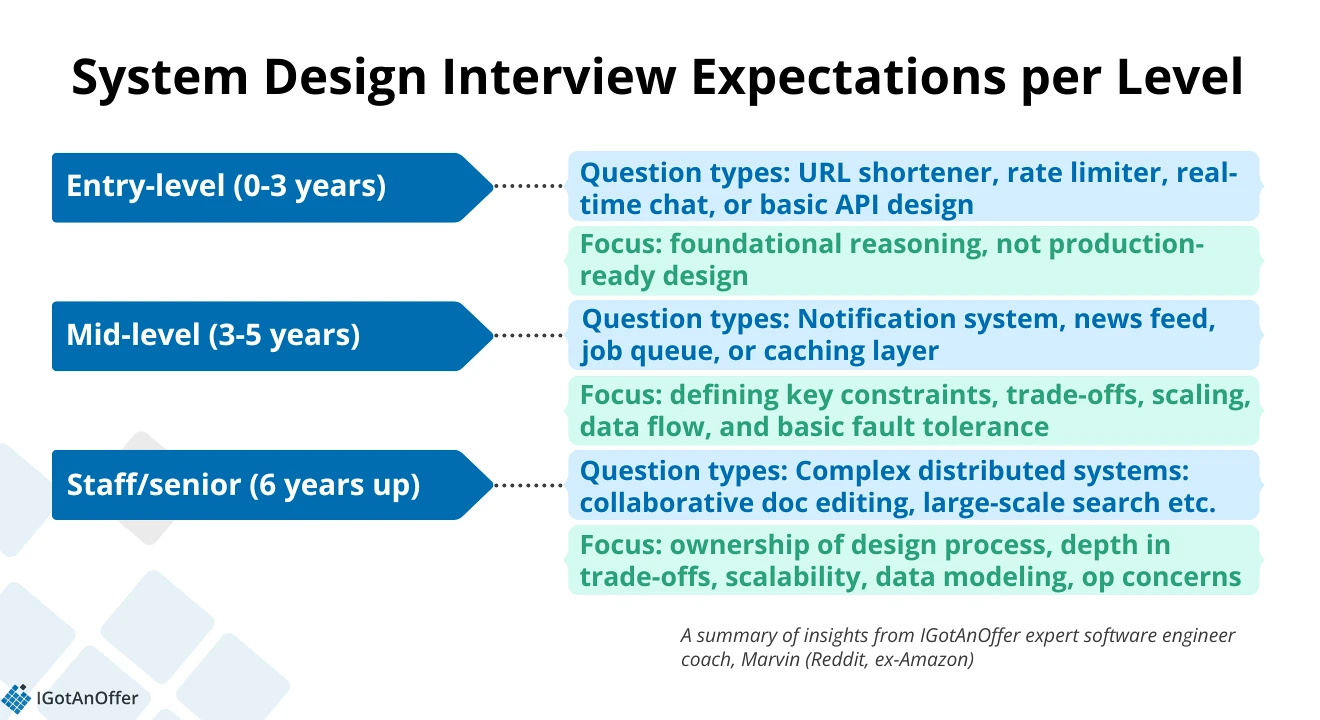
The requirements for system design interview performance vary by career level. And although OpenAI doesn’t publicly define level-specific expectations, below are the general types of questions you can reference and what interviewers typically expect you to cover at each level.
Entry-level engineer
As mentioned earlier, system design interviews are more common for mid- to senior-level positions. However, entry-level candidates may still encounter basic system design questions to assess their knowledge of core concepts.
As a junior engineer with less than 3 years of experience, you could expect basic system design questions. The most common ones you’ll get are for a URL shortener (Design TinyURL), rate limiter, real-time chat, or any basic API design.
“At this level, interviewers typically don’t expect full architectural depth,” Marvin (Sr. Software Engineer at Reddit, ex-Amazon) says. So you don’t need to provide a production-ready design. Instead, the focus will be on foundational reasoning.
You’ll need to demonstrate clarity in communication, structured thinking, and basic understanding of key components (e.g., databases, caches, queues). These matter more than getting the 'right' answer.
How to ace your system design interview as an entry-level engineer? Marvin’s advice: “Asking clarifying questions and articulating trade-offs go a long way.”
Mid-level engineer
Applying for a mid-level position requires a step up in systems thinking and component-level discussion. To assess you on these, interviewers will likely ask you to design a notification system, newsfeed, job queue, or caching layer.
During your system design interview, you should drive the conversation, define key constraints, and discuss trade-offs. Marvin says, “You’ll be expected to go deeper into scaling, data flow, and basic fault tolerance.”
Finally, according to Marvin, good signals for mid-level engineers include thoughtful simplification and an awareness of real-world constraints.
Senior/staff engineer
The rule of thumb for SD interviews is that the more senior you are, the more system design interview sessions you’ll need to go through.
The level of complexity expected from your system design interviews also changes. At your level, you should have ownership of the entire design process, according to Marvin.
The questions you’ll get will likely be about complex distributed systems like collaborative document editing, large-scale search, or real-time analytics pipelines. Expect discussions around sharding, consistency, rate limiting, and trade-offs at scale.
At the staff level, you are expected to think about longer-term considerations such as system maintenance and future development, according to reports from OpenAI senior software engineers on Reddit.
You should also be able to show the importance of “proactively addressing cross-cutting concerns like operational and deployment toil, security, privacy, and team hiring”.
Furthermore, candidates should be able to make reasonable build-versus-buy decisions given budget and control constraints, and identify bottlenecks at multiple levels, from high-level architecture down to OS-level performance issues.
If you're specifically targeting a Staff-level role, we also recommend checking out our Staff system design interview guide for a deeper dive into what interviewers expect at this level.
1.3 High-level design (HLD) vs. low-level design (LLD)
Now, let’s get into the difference between high-level design (HLD) and low-level design (LLD).
1.3.1 High-level design or HLD
You could describe HLD as the bird’s-eye view or the big picture of an entire system architecture. With HLD, you would be expected to cover the following:
- Functional requirements: Core features (send message, post tweet, search user, etc.).
- Non-functional requirements: Scale, latency, throughput, availability, consistency.
- Traffic estimates and capacity planning: Requests/sec, storage size, growth projections.
- Architecture components:
- Load balancers
- Application/API servers
- Databases (SQL vs NoSQL, sharding, replication)
- Caches, queues, CDNs, pub/sub
- Data flows: Read path vs write path, how requests move through the system
- Trade-offs: CAP theorem, eventual vs strong consistency, cost vs scalability.
The goal of your interviewer is to assess whether you can design a reliable and scalable system that can work in real-world conditions and constraints.
1.3.2 Low-level design or LLD
LLD goes deeper into the details of how a system works, i.e., how the internal components are structured and work together. With LLD, you will be expected to cover:
- Object-oriented modeling: Classes, objects, interfaces, relationships
- Design patterns: Factory, Strategy, Observer, Singleton, etc.
- APIs and methods: Clear function signatures, parameters, return types
- Data models: Table schemas, indexes, relationships, how queries are optimized
- Component interactions: Sequence diagrams, how modules talk to each other
- Edge cases and validations: Error handling, retries, testing considerations
- Maintainability: Clean abstractions, modularity, extensibility
Asking you to drill down into LLD, interviewers want to see how you would translate and implement a high-level design for real-world use.
You should be able to communicate clearly and with depth, anticipate real-world constraints (and suggest ways to handle them), and reason about tradeoffs.
1.3.3 HLD vs. LLD - what will you cover at your level?
So, which one would you be expected to cover at your OpenAI system design interview?
For freshers and entry-level engineers, a basic understanding of system design concepts is expected, but nothing too complex.
When you do look it up online, you’ll see that freshers and entry-level do get LLD questions. But these will mostly focus on testing your knowledge of Object-Oriented Programming (OOP) fundamentals, design patterns, and coding hygiene.
Typically, covering both HLD and LLD is expected in mid-level engineers. At this level, you’re expected to own features end-to-end, so you must be able to design APIs, schemas, AND consider scale and integration.
At a senior or staff level, you’ll mostly focus on HLD, designing systems at a scale that can serve millions of users. However, you could also be asked to drill down into LLD. You need to prove that you can bridge high-level architecture with low-level implementation.
To learn more about these two topics, we recommend reading the following deep dives:
Coaches who contributed to this guide


















2. Common OpenAI system design interview questions (and answers) ↑
Now that you know the different expectations for system design interviews at various levels, let’s get into some common OpenAI system design questions.
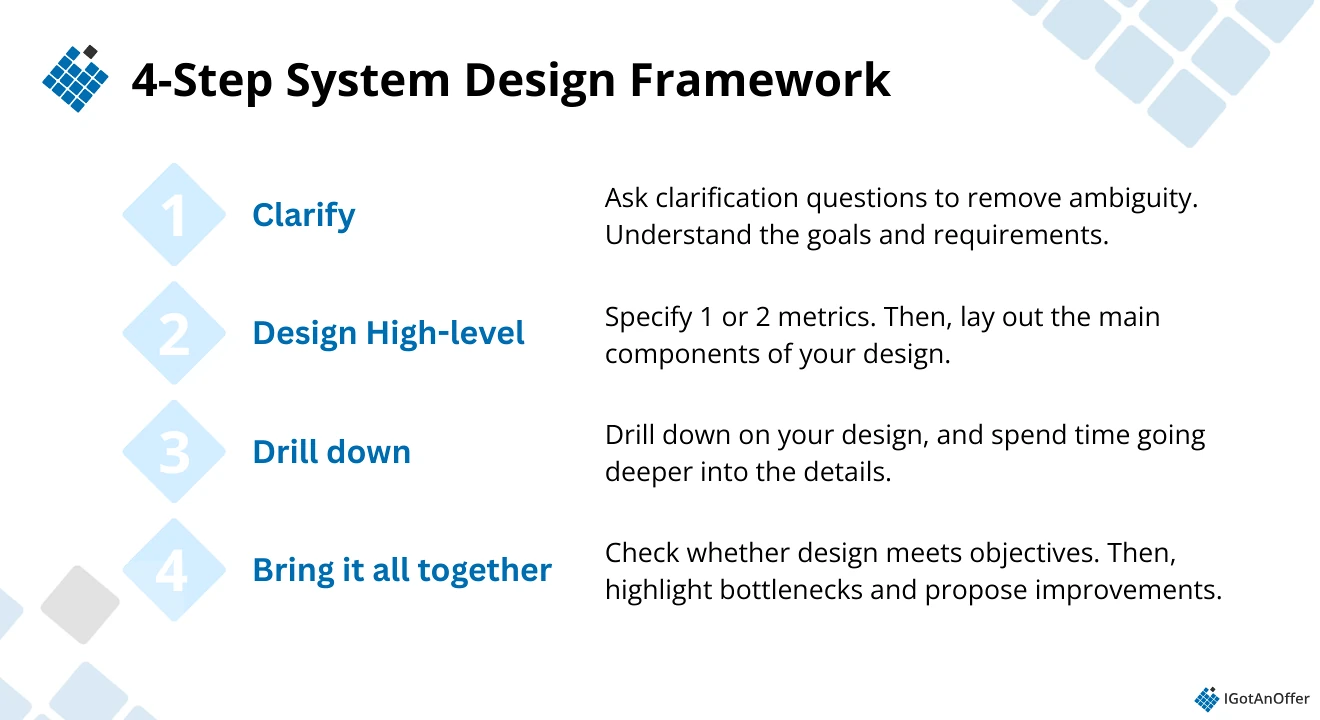
We picked out three of the most commonly asked questions, explained why interviewers at OpenAI ask them, and provided sample outlines using the 4-step answer framework below that we often recommend to candidates (see Section 4.2 for a detailed explanation).
Try working on the system design interview question first, and then check your answer against the expert’s to find out where you can still improve.
- How would you design an LLM-powered enterprise search system?
- Design an in-memory database.
- Design Slack
Let’s get started.
2.1 How would you design an LLM-powered enterprise search system?
This is a very common system design interview question that SWE candidates are likely to encounter during the final onsite interviews.
OpenAI's 2025 report says that ChatGPT's weekly users have grown to more than 800 million. As an SWE candidate, you’ll need to demonstrate that you’re able to design systems that are highly scalable and can keep up with the growth of OpenAI’s products.
More than that, this question allows interviewers to assess whether you can design an end-to-end system that incorporates LLMs into a broader distributed architecture. Think of availability, core systems, databases, reliability, scalability, storage, partition tolerance, and related concepts.
Let’s look at an example answer outline you can use.
Example answer outline: "Build an LLM-powered enterprise search system."
1. Ask clarifying questions
- Functional requirements:
- Full-text search across multiple data sources (e.g., documents, emails, databases).
- Support for natural language queries (e.g., "What is the revenue for Q1 2025?").
- Advanced filtering and ranking based on context.
- Provide answers in the form of summaries or direct excerpts from the documents.
- Non-functional requirements:
- Scalability: Must handle large datasets and high query traffic.
- Real-time: Low-latency search responses.
- Security: Ensure role-based access control and data privacy.
- Accuracy: High precision in retrieving relevant documents.
2. Design high-level
- LLM Integration: Use a large language model (LLM) like OpenAI's GPT, fine-tuned for the enterprise’s domain.
- Query Processing: Use the LLM to interpret natural language queries and generate relevant search results.
- Embedding Models: Use embedding models (like OpenAI embeddings or Sentence-BERT) to convert documents and queries into vector representations.
- Data storage:
- Use a search engine (e.g., Elasticsearch, Solr) for indexing and querying text data.
- Document Database: Store the actual documents (e.g., SQL or NoSQL, depending on structure).
- Search pipeline:
- Data Ingestion: Collect and preprocess data (documents, emails, etc.).
- Vectorization: Use the embedding model to convert documents and queries into vectors.
- Search Engine: Perform a basic vector-based search with a ranking algorithm.
- LLM Query Handling: If needed, use the LLM to further process and refine results.
- UI/frontend: A search interface for users to input queries and receive results, providing relevant document snippets and summaries.
3. Drill down on your design
Dig deeper into the components of the system.
- Data ingestion:
- Implement connectors to ingest data from multiple sources (e.g., APIs, file systems).
- Use ETL (Extract, Transform, Load) pipelines for preprocessing.
- Vectorization:
- Use embedding models to convert documents into vectors for semantic search.
- Store document vectors in a high-performance vector database (e.g., Pinecone or FAISS) for fast retrieval.
- Search engine:
- Elasticsearch or similar tool to handle keyword-based search.
- Combine vector search with traditional keyword search for hybrid retrieval.
- LLM query interpretation:
- Use the LLM to interpret user queries, clarify intent, and refine results (e.g., summarizing documents or re-ranking search results).
- Ranking & relevance:
- Use a combination of semantic similarity (from embeddings) and traditional keyword matching to rank documents.
- Optionally, integrate machine learning models for relevance-based ranking.
4. Bring it all together by addressing potential problems and optimizations
Scalability and performance
- Horizontal Scaling: Scale the search infrastructure using load balancers and distributed systems.
- Caching: Use caching (e.g., Redis) to store frequently accessed search results and reduce latency.
- Sharding: Split document storage across multiple servers or nodes to handle large datasets.
Security
- Role-Based Access Control: Implement access control to restrict search results based on user roles.
- Data Privacy: Ensure that sensitive information is not exposed to unauthorized users.
Monitoring and logging
- Implement monitoring for query performance, error rates, and system health (e.g., using Prometheus, Grafana).
- Track and log user queries and results for continuous improvement and to train the LLM further.
Identified challenges and trade-offs
- Latency vs. Accuracy: Balancing fast query responses with the need for high-quality, accurate results.
- Data Consistency: Keeping the index and the vector database in sync with real-time data updates.
- Cost: High costs associated with using LLMs and scaling search infrastructure.
2.2 Design an in-memory database. ↑
According to its interview guide, OpenAI is eager to hire experts but is also keen on candidates who may not be specialized yet but have high potential.
With this system design interview question, the interviewer is looking to probe into your knowledge of core computer concepts and how you use them to solve problems and make decisions at work. They want to know if you have the fundamental skills, even if you’re not yet specialized.
Below is one way you can approach this question.
Example answer outline: "Design an in-memory database."
1. Ask clarifying questions
- Functional: CRUD operations, key-value store, optional data expiry, high concurrency.
- Non-functional: Low latency, scalability, fault tolerance, memory efficiency.
2. Design high-level
- In-Memory Storage: Use a hash map for fast key-value access.
- Persistence: Periodic snapshotting and/or write-ahead logs for durability.
- Concurrency: Use locks or atomic operations for concurrent access.
- Data Expiry: Implement TTL or LRU eviction for expired keys.
3. Drill down on the components of your design
- In-Memory Store: Hash map or skip list for fast retrieval.
- Persistence: Periodic snapshots and logs for recovery.
- Concurrency: Read-write locks, atomic operations, or transactions for consistency.
- Eviction: TTL or LRU for automatic key expiry.
4. Bring it all together by addressing potential problems and optimizations
Scalability and Performance
- Horizontal Scaling: Use sharding for large data sets, replication for availability.
- Caching: Use LRU cache for memory optimization.
- High Throughput: Ensure O(1) operation time and support batch operations.
Security
- Access Control: Role-based access control (RBAC) and encryption.
- Data Privacy: Secure data handling and access management.
Monitoring and logging
- Metrics: Monitor system health (e.g., Prometheus).
- Error Logging: Track operation failures and crashes.
- Usage Logging: Log access patterns for troubleshooting.
Identified challenges and trade-offs
- Memory Usage: Limited by RAM, mitigated with compression or overflow to disk.
- Persistence vs. Performance: Balancing durability and speed (e.g., write logs vs. snapshots).
- Concurrency: Handling concurrent writes and consistency in distributed systems.
Proposed enhancements
- Distributed Database: For horizontal scalability.
- Advanced Indexing: Secondary indexing for complex queries.
2.3 Design Slack ↑
Interviewers at OpenAI probably like to ask this question because the requirements of a modern communication app like Slack mirror the core infrastructure that OpenAI needs for LLM interactions.
Slack requires you to handle high volumes of concurrent connections, preserve message ordering, manage fan-out to many users, and maintain consistency across clients, all under tight latency and reliability constraints.
These are the same kinds of system-level challenges that are apparent in OpenAI’s products, where user interactions are continuous, stateful, and latency-sensitive.
Let’s get into a sample outline you can use to structure your answer.
Example answer outline: “Design Slack.”
1. Ask clarifying questions
Functional requirements
- Real-time messaging (DMs + channels)
- Message persistence + search
- Presence indicators
- File sharing
- Notifications
- Multi-workspace + multi-device support
Non-functional requirements
- High availability
- Low latency (sub-200ms delivery)
- Horizontal scalability
- Strong consistency for message ordering within a channel
Focus: on messaging, fan-out, storage, and real-time delivery.
2. Design high-level
- Clients → WebSockets for duplex communication
- API Gateway → Authentication, rate limits
- Chat Service → Handles message ingestion and fan-out
- Message Broker (Kafka/Pulsar) → Durable event log + ordered channel streams
- Channel Service → Writes messages to storage + pushes to subscribers
- Storage
- Hot path: NoSQL (Cassandra/DynamoDB) for messages
- Search: Elasticsearch/OpenSearch
- Blob store: S3/GCS for file uploads
- Presence Service (Redis + pub/sub)
- Notification Service for offline users
- CDN for file attachments
3. Drill down on your design
Messaging Flow
- Client sends message over WebSocket → API → Chat Service
- Chat Service produces event to Kafka partition keyed by channel ID (guarantees order)
- Channel Service consumes events, writes to storage, and pushes to all online members via WebSocket fan-out servers
- Offline users get push notifications via Notification Service
Message Ordering
- Partition per channel = strict ordering inside channels
- No global ordering needed
Fan-Out
- “Fan-out on write”: Channel Service pushes to all active WebSocket connections
- Store user-to-server mapping in Redis for fast lookup
Presence
- WebSocket connect/disconnect triggers heartbeats
- Store active connections in Redis
- Publish updates via pub/sub → clients subscribed to presence channels
Storage
- Messages: Time-series table (partition by channel, sort by timestamp)
- Search: Write-ahead to Elasticsearch asynchronously
- Files: Upload to object storage; store only metadata in DB
Multi-Device Consistency
- Clients sync via “last read cursor” per channel
- Any missing messages pulled from storage
4. Bring it all together
Scaling + Reliability
- Stateless services behind load balancers
- Kafka scaled by adding partitions (bounded by # channels)
- WebSocket fleet autoscaled
- Backpressure from Kafka if consumers lag
- Multi-AZ deployment, cross-region replication for DR
- Rate limiting & spam protection per user/workspace
Biggest Challenges & Solutions
- Hot channels: shard-based on thread or subchannel
- Exploding fan-out: batch sends, compress payloads
- Search indexing lag: async pipelines with retry queues
- Mobile offline sync: efficient delta fetch
2.4. More OpenAI system design questions (by role) ↑
Now, let’s get into the complete list of system design interview questions reported on Glassdoor for two roles at OpenAI: software engineer and member of technical staff.
Keep in mind that, in most cases, your interviewer will adapt the question to your background. For example, if you’ve worked extensively on backend services or APIs, you may be asked to design a system in a similar domain.
However, that won't always be the case. So, it’s best to practice with the questions below to be ready to design any type of product or system at a high level.
Examples of OpenAI system design interview questions: software engineers
- Design Slack.
- Design TikTok.
- Design ChatGPT.
- Design GitHub Actions from scratch.
- Design an API for an in-memory database.
- Design SQL, in-memory DB in your language of choice.
- How would you design an LLM-powered enterprise search system?
- How would you design an AI chatbot?
- How would you design a scalable and efficient system for training a large language model (LLM), considering both computational and data constraints?
- You’re provided with a simple UI for user preferences. Design the server-side system behind it, including API endpoints, data models, and considerations around scalability and reliability.
Examples of OpenAI system design interview questions: member of technical staff
- Design an in-memory database.
- Design a webhook system.
- Design a web crawler at scale.
- Design a fault-tolerant, polite web crawling service that can scale to 10M requests per second.
You can also check out the following guides for additional tips and practice questions:
- System design interview questions guide, where you’ll find more insights, example questions, and answer outlines from FAANG experts
- Machine learning system design interview or generative AI system design interview guides, if you're applying for an AI/ML engineering role.
- System design interview questions for product managers, if you're applying to PM-T roles
- System design interview questions for data engineers, if you're applying to data engineering roles
3. Tips to improve your system design interviewing technique ↑
For this section, we’ve gathered tips from four of our system design interview coaches, Mark, Marvin, Oussama, and Ashish. Collectively, they’ve conducted hundreds of interviews, both actual and mock, at top tech companies such as Google, Meta, and Amazon.
Here are their tips, based on what they’ve seen on the ground:
Tip #1: Communicate efficiently
Forty-five minutes is an artificially compressed time. You won't be used to working and talking about things at this speed, and so you need to practice communicating with the interviewer efficiently.
During the interview, you want to make sure the interviewer can follow your thought process. It’s completely fine if they don’t agree with every single decision you make.
“What you need to do is keep your mental model of what you’re thinking and their mental model as closely aligned as possible.” Mark
Tip #2: Reduce the scope of the problem.
In system design interviews, you're often asked to design entire large-scale systems like Spotify or YouTube. In ~45mins, this is impossible, so first you need to reduce the scope.
For example, you might suggest to your interviewer that you focus on a specific, crucial part of the system, such as the backend architecture or a particular feature (e.g., if you were designing Spotify, this might be the music recommendation engine).
"Scope the problem to a size that you think you can complete during the interview.” Mark.
Tip #3: State your assumptions clearly
Most system design questions are intentionally vague because interviewers want to see how you handle ambiguity and make reasonable decisions with incomplete information.
By stating your assumptions early on, you give the interviewer a chance to confirm or correct your direction before you go too far down the wrong path.
“Feel free to make assumptions as long as you communicate them clearly. Share your thought process, including both the choices you make and the ones you discard.” Oussama
Tip #4: Start drawing ~15mins in
Drawing is an important visual aid to help the interviewer understand your answer. A good rule of thumb is to start drawing around a third of the way into the interview. Ideally, once you’ve clarified the requirements and aligned on scope.
This ensures that your diagram supports the discussion and doesn’t lock you into a premature design.
“If you start drawing too soon, you might start going down a road that doesn’t address the problem.” Mark
Tip #5: Start with a simple design and iterate
When working through a system design problem, aim to get to a working solution first, then iterate. Don’t get sidetracked by adding requirements that didn’t exist in the question, as these will complicate your design.
You can always acknowledge something and come back to it later. For example, “We’ll need to use caching here, but I’ll come back to that later.”
“Candidates often make the mistake of designing for an unrealistic scale without grounding in problem constraints, and not prioritizing or evolving the design incrementally,” Marvin says
Tip #6: Properly understand the problem
It’s very tempting to jump straight into solution mode as soon as you hear the problem. However, doing so can prevent you from fully understanding what’s being asked and lead to incorrect assumptions that affect the rest of your design.
To avoid this, imagine you're calling your own APIs and think about specific use cases. This will help ensure you really understand what the problem is and what the objective is. It can help you catch assumptions you’ll likely make in your instant solution mode.
Doing this early also reduces the risk of glossing over important trade-offs, failure scenarios, or state consistency, which is another common mistake observed by our experts.
Tip #7: Practice, practice, practice!
There is a knowing and doing gap with system design interviews. Learning the theory and reading prep guides is great, but you need to practice out loud with friends or experts, or at least record yourself and watch yourself back.
Doing so can help build your confidence and reduce stress as you get more comfortable explaining your ideas in an interview setting.
If you do some mock interviews, which are hugely helpful, ideally allow time for long feedback and conversation afterward.
Tip #8: Explain your thinking
Give your reasons as to why you're making each choice you do. Why did you choose one particular technology over another one? Interviewers want to understand what's behind a candidate’s thinking to assess their level of technical judgment.
“Not only do you understand why you're making a choice and the different aspects of different technology choices, but you're also communicating it to me in a way that I can understand.” Mark
Tip #9: Get comfortable with the math
For FAANG companies, scale is important in system design interviews. That means you're going to have to do some back-of-the-envelope calculations early on in your design. Get used to calculating queries per second and the storage capacity needed.
Tip #10: Use the drawing tool efficiently
Your drawing is a visual aid; it doesn't need to look pretty, but you do need to be able to create boxes, shapes, and arrows quickly without having to think much about it.
Try to find out which tool the company you're interviewing with will want you to use and make sure you're comfortable using it.
Tip #11: Avoid getting lost in technical details
A common mistake in system design interviews is spending too much time on low-level details before establishing the overall architecture. Interviewers care first about how you structure the system, identify essential components, and reason trade-offs.
If you notice that your explanation is getting overly technical, pause and reframe your answer at a higher level before diving back into the problem.
Remember, software engineers also work with cross-functional teams. So, it’s important to communicate your thought process in a way that non-technical stakeholders can easily understand.
“Try to avoid overloading your answers with jargon and AI buzzwords.” Ashish
4. How to prepare for OpenAI system design interviews ↑
As you can see from the complex questions above, there is a lot of ground to cover when it comes to system design interview preparation. So it’s best to take a systematic approach to make the most of your practice time.
Below are links to free resources and a plan to help you prepare for your OpenAI system design interviews.
4.1 Learn the concepts
There is a base level of knowledge required to be able to speak intelligently about system design. You don't need to know EVERYTHING about sharding, load balancing, queues, etc.
However, you will need to understand the high-level function of typical system components. You'll also want to know how these components relate to each other, and any relevant industry standards or major tradeoffs.
To help you get the foundational knowledge you need, we've put together a series of 9 system design concept guides.
Here's the full list:
- Network protocols and proxies, which make it possible for any networked computers to talk to each other, no matter where they are or what hardware or software they’re running.
- Databases, integral components of the world’s biggest technology systems.
- Latency, throughput, and availability, three common metrics for measuring system performance.
- Load balancing, the process of distributing tasks over a set of computing nodes to improve the performance and reliability of the system.
- Leader election algorithms, which describe how a cluster of nodes without a leader can communicate with each other to choose exactly one of themselves to become the leader.
- Caching, a technique that stores copies of frequently used application data in a layer of smaller, faster memory in order to compute costs and to improve data retrieval times and throughput.
- Sharding, the horizontal scaling of a database system that is accomplished by breaking the database up into smaller “shards,” which are separate database servers that all contain a subset of the overall dataset.
- Polling, SSE, and WebSockets, techniques for streaming high volumes of data to or from a server.
- Queues and pub-sub, mechanisms that allow a system to process messages asynchronously, avoiding bottlenecks and helping the system to operate more efficiently.
OpenAI system design interviews require a fundamental understanding of system design. If you need a quick refresher, check out our system design interview prep guide and our list of 19 system design interview tips from ex-interviewers for additional tips and resources.
4.2 Learn an answer framework
As you likely noticed in the common questions section, we recommend using a repeatable answer framework when answering system design interview questions.
1. Ask clarifying questions
First, spend about five minutes checking in with your interviewer about the functional and non-functional requirements of what you’re going to design. Ask about the system’s goals and how they will be measured. Be sure that you fully understand the question before moving forward.
Call out any assumptions you’re making that will influence your design approach. If applicable, ask about non-functional requirements such as availability, consistency, scalability, etc.
2. Design high-level
Start the high-level design by specifying one to two metrics (e.g., number of users added, products sold before vs after a feature launch, etc.). Then use these metrics to do some simple calculations in order to find the optimal usage pool of the system.
Once you’ve defined your metrics, map out only the most functional components of the system (e.g,. front end, web server, database, etc.).
Finally, before getting into the more detailed aspects of your system, make some decisions on how you will design its database. Choose whether it will be a relational or a NoSQL database, as well as its metadata and table structure.
3. Drill down on your design
If you haven’t already, start mapping out the system on your whiteboard. Talk through your diagram so that your interviewer is able to follow along and ask questions when necessary.
Consider any bottlenecks that may arise when it comes to the system’s scalability, performance, or flexibility.
To finalize your design, play to your strengths by choosing a component you’re more familiar with and drilling down on it. If you’re not sure which component would be best to explore, ask your interviewer.
4. Bring it all together
Before wrapping up the round, take about five minutes to re-examine what you’ve designed. Does it meet the objectives you laid out with the interviewer at the beginning of the session?
It is okay to change some components at this stage if you think it will improve the system, but you must explain to the interviewer what you are doing and why.
Learn more about that framework in our guide on how to answer system design questions.
Apply this framework to practice questions like those we’ve included in this article. Use it on different types of questions in a variety of subjects, so that you learn how to adapt it to different situations and respond to unpredictable questions on the fly.
4.3 Dive deep into OpenAI’s culture and products
Be sure that you’re up to date on the latest OpenAI products and releases, as well as their legacy products, as you’ll most likely be asked system design questions that relate to them. Here are some resources that can help:
- OpenAI’s mission statement (by OpenAI)
- OpenAI’s values (by OpenAI)
- OpenAI strategy teardown (by CBS Insights)
- OpenAI’s company blog (by OpenAI)
- OpenAI’s product press releases (by OpenAI)
Your system design interviews at OpenAI will be part of a larger interview process. For help understanding the overall interview process and practice questions for every type of question you’ll be asked, use one of IGotAnOffer’s guides below.
- OpenAI interview process and timeline
- How to get a job at OpenAI
- Common OpenAI interview questions (by role, with answers)
- OpenAI behavioral interview questions
- How to answer "Why OpenAI?" interview and application question
- OpenAI coding interview questions
- OpenAI Software Engineer Interview
- OpenAI Product Manager Interview
- OpenAI Data Scientist Interview
- OpenAI Research Scientist Interview
- OpenAI Forward Deployed Engineer Interview
If you're looking into other AI/ML-forward tech companies, we also recommend reading the following company guides:
- Anthropic interview process
- Anthropic culture interview questions
- Anthropic system design questions
- 30+ common Anthropic interview questions and how to answer them
- How to answer "Why Anthropic" interview and application question
4.4 Practice answering questions
You'll need to spend a good amount of time practicing answering questions on your own or watching mock interviews on YouTube.
We’ve linked to a few good mock interview videos and sample solutions below if you want more examples to learn from.
Example system design questions - with solutions
The easiest way to start practicing under simulated interview conditions is to practice interview questions out loud or with peers. But if you want to get more actionable feedback and OpenAI-specific tips, we highly recommend practicing with an expert.
4.5 Practice by yourself
A great way to start practicing is to interview yourself out loud. This may sound strange, but it will significantly improve the way you communicate your answers during an interview.
Use a piece of paper and a pen to simulate a whiteboard session, or use a whiteboard if you have one. OpenAI uses Excalidraw for its system design interviews, so it would be helpful to practice using it.
Play the role of both the candidate and the interviewer, asking questions and answering them, just like two people would in an interview. Trust us, it works.
4.6 Practice with peers
Once you've done some individual practice, we strongly recommend that you practice with someone else interviewing you.
If you have friends or peers who can do mock interviews with you, that's an option worth trying. It’s free, but be warned, you may come up against the following problems:
- It’s hard to know if the feedback you get is accurate
- They’re unlikely to have insider knowledge of interviews at your target company
- On peer platforms, people often waste your time by not showing up
For those reasons, many candidates skip peer mock interviews and go straight to mock interviews with an expert.
Get feedback from experienced system design interviewers ↑
In our experience, practicing real interviews with experts who can give you company-specific feedback makes a huge difference.
Find an OpenAI system design interview coach so you can:
- Test yourself under real interview conditions
- Get accurate feedback from a real expert
- Build your confidence
- Get company-specific insights
- Save time by focusing your preparation
Landing a job at a big tech company often results in a $50,000 per year or more increase in total compensation. In our experience, three or four coaching sessions worth ~$500 make a significant difference in your ability to land the job. That’s an ROI of 100x
Click here to book system design mock interviews with experienced system design interviewers.